What is bleed?
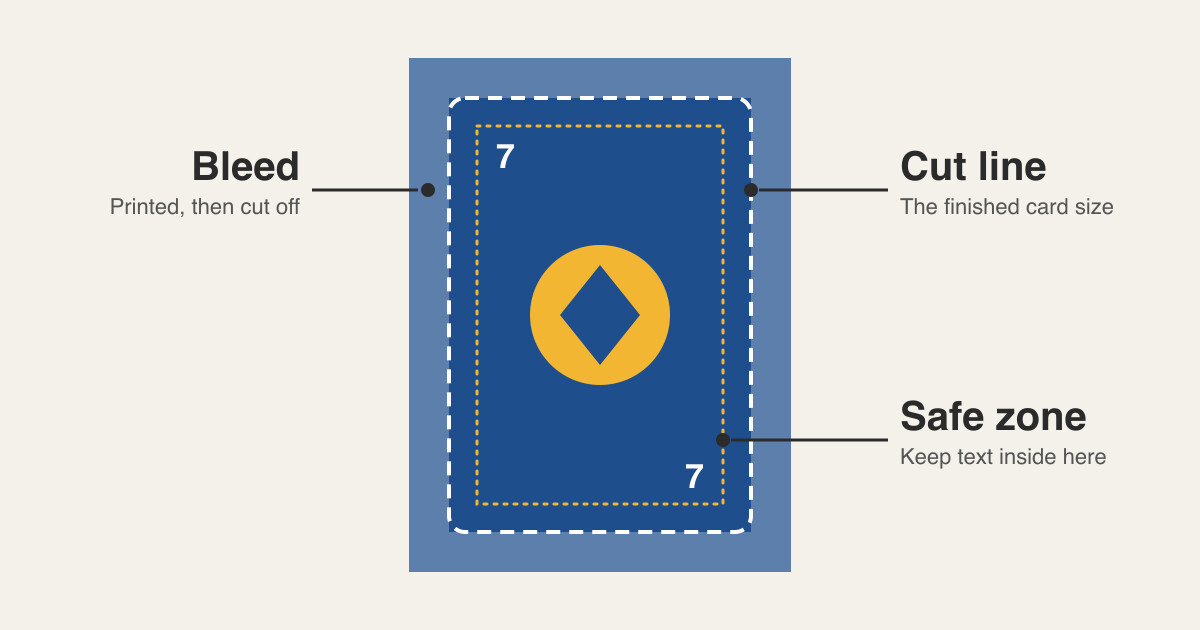
When printing cards, we have a couple of challenges:
- We’re printing on the front and the back
- We’re cutting the cards out of a large sheet
If the print alignment isn’t right, or the cutting is slightly off, we’ll end up with unprinted white edges around the cards.
The way we solve both of these problems is with bleed.
Bleed is just an extra bit of printed area around the card, which allows for imperfect print alignment and cutting.
A reasonable amount of bleed is 3mm on each edge of the card. This works out to about 36 pixels on a standard poker sized card in Card Game Builder. This amount of bleed works for both professional printers, and should also enough if printing and cutting cards at home.
The safe zone
The inverse of bleed is the safe zone.
Just as misaligned cuts could show unprinted white edges, it could also cut off useful bits of information from the card.
So we need to keep important information away from the edge of the card. This is called the safe zone (see the diagram above).
Adding bleed in Card Game Builder
When creating a new template, you can set the Bleed (px) value.
You can change it later on, by clicking ‘Edit Dimensions’ on the template page.